
Office Ergonomics - Positioning the Monitor
On this page
- Why should we worry about positioning the monitor?
- What factors decide the proper position of the computer monitor?
- What should you know while setting up an appropriate viewing angle?
- What should you know while setting up (selecting) a proper viewing distance?
- How should multiple monitors be set up?
Why should we worry about positioning the monitor?
Back to topThe monitor is an integral part of a computer workstation. When placed in the wrong position it can force the operator to work in a variety of awkward positions. Working with one's chin tilted upwards, and the head and upper body bent forwards or sideways is common wherever the monitor is improperly situated. Such forced working body positions significantly contribute to the operator's discomfort, and can potentially lead to work related musculoskeletal disorders (WMSD). Other adverse effects of a poorly located monitor are eye irritation, blurred vision, dry burning eyes and headaches, collectively called eyestrain.
Common complaints among computer operators include discomfort, aches and pains in the neck and shoulder, and eyestrain.
What factors decide the proper position of the computer monitor?
Back to topPostural discomfort and the consequent aches and pains result from the effort to view the monitor when it is set at the wrong place in relation to the operator's position. Two factors come into play: viewing angle and viewing distance. Viewing angle refers to the degree above or below an imaginary horizontal line at the level of the viewer's eyes and the centre of the object being looked at; in case of a computer work it is the centre of the screen (see Figure 1). Viewing distance refers to the space between the operator's eyes and the screen (see Figure 1). A poor angle leads to postural (neck and shoulders) discomfort, while the wrong distance can contribute to eyestrain.
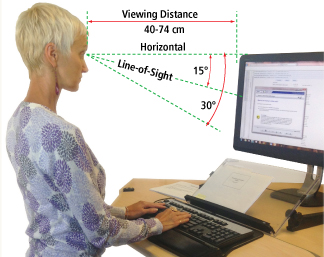
Figure 1
The existing guidelines and recommendations on both viewing angle and particularly on viewing distance differ, sometimes significantly from one another. For this reason they should not be taken as a commandment "carved in stone" but merely as guidelines. As such, they can be used as a starting point for tailoring any given situation.
What should you know while setting up an appropriate viewing angle?
Back to topResearchers agree that at rest, the eyes naturally assume a straightforward and downward cast (see Figure 1) line of sight. How far downwards, however, is not clear. Experimental findings range from about 15 degrees to almost 30 degrees. People engaged in visually demanding tasks limit their downward eye movements to about half of the whole available range of 60 degrees.
Therefore, for comfortable viewing of images on a computer screen it is reasonable to place the monitor at about 15 degrees (or slightly lower) below the horizontal line. Such a location creates a preferable visual zone of 30 degrees (+ 15 degrees to -15 degrees from the normal line of sight).
Numerous field studies among people doing intense visual work indicate that looking upwards (above the horizontal) is tiring. On the other hand, looking downwards, that is, lower than 15 degrees below the horizontal, was not reported as particularly fatiguing. This finding allows one to extend the visual zone downward by another 15 degrees (an acceptable visual zone) for a total of 45 degrees (see Figure 2).
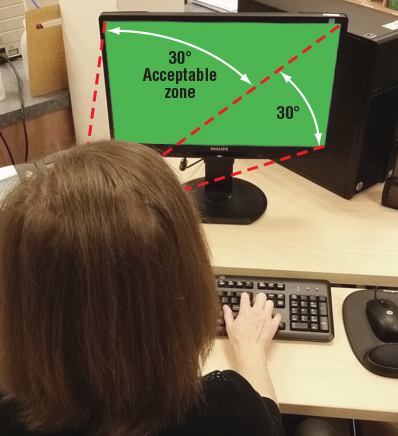
Figure 2
Tips on monitor placement include:
- Occasionally, desktop monitors are placed on top of the hard case or computer processing unit. A monitor located at a high height is a source of discomfort and, in the long run, can cause musculoskeletal problems in the neck and shoulder area. The fact that discomfort caused by a monitor which is too high (above the horizontal) is worse than one which is slightly too low (below an acceptable visual zone) should be kept in mind while arranging a monitor at any workstation.
- When using a tall monitor or one that is oriented to the "portrait" position, make sure that the top of the screen is not at a level higher than the operator's eye.
- When using a wide monitor, consider how the size requires the operator to rotate the neck to view the contents of the screen. It may be necessary to move the monitor further away from the operator.
- Individuals who wear corrective lenses for reading or close work (e.g., bi-focals, tri-focals, and progressive lenses) may find placing the top of the monitor slightly below eye level more comfortable. Because the lower part of the lens is used for close vision, lowering the monitor may help reduce tilting the head to see the screen.
What should you know while setting up (selecting) a proper viewing distance?
Back to topLooking at far distances does not cause eyestrain - it is the muscular effort required to focus on objects at close distances that strains the eyes, espeically in low lighting. The distinction between "far distance" and "close distance" is never "razor sharp". It is not only individual but it also can change over time, for example, due to age.
Accommodation* and convergence** are the two main functions, which govern the viewing of objects at closer distances. The shorter the viewing distance, the greater the muscular effort required for accommodation and convergence, and which, in turn, increases the risk for eye discomfort. A greater viewing distance, on the other hand, reduces the risk for eyestrain but can make the resolving of the finer images or characters displayed on the computer screen more difficult. Consequently, the right viewing distance is the one at which the computer operator can easily read the screen without experiencing eyestrain.
The eyes have a default accommodation distance, called the Resting Point of Accommodation (RPA) and a default Resting Point of Vergence (RPV). In practical terms, at distances greater than the RPA and RPV, there is no need for either accommodation or convergence. Under these conditions, individuals with perfect (20/20) vision or those with properly corrected vision are not likely to experience eyestrain (assuming they take appropriate eye "rest breaks" from focusing on the screen).
Resting point of accommodation (RPA) is typically around 80 cm (about 31.5 in.) and generally increases with age. Resting point of vergence (RPV) is a bit further than RPA, averaging around 112 cm (about 44 in.) or 90 cm (about 35.5 in.) with a downward viewing angle of 30 degrees (supporting the recommendation that monitors should be positioned just below the horizontal). Generally speaking, an arm’s length is usually a good estimation of how far the monitor should be positioned, with adjustments made based on the operator’s characteristics and preferences. In the situation where the recommended viewing distance is too great for the operator to see images clearly it is better to increase the font size (images) than to force a shorter viewing distance.
* Accommodation is the automatic adjustment of the eye for focusing on near objects. The eyes achieve this by changing the convexity (or shape) of the lenses.
** Convergence is the automatic inward (toward the nose) turn of the eyes when viewing close objects.
How should multiple monitors be set up?
Back to topSimilar to using a single monitor, appropriate set up of multiple monitors is essential to help reduce work-related musculoskeletal disorders. While still following the recommendations for a single monitor, the challenge is reducing head and body twisting and eye travel.
First, determine how much you use each monitor. Do you use one more than the other(s)?
If you use all monitors equally:
- Position the monitors in front of you with the edges touching.
- Place the monitors at an angle, creating a semi-circle.
If you use one monitor more often :
- Place the monitor you use most directly in front of you as if it were a single monitor.
- Place the secondary monitor on one side, and at an angle (half of a semi-circle).
In both cases, monitors should still be about an arm's length from your body, and at the same height (eye level or slightly lower if using corrective lenses) as described above.
- Fact sheet last revised: 2022-11-29