
Office Ergonomics - Computer Mouse - Location - Beside Keyboard
On this page
Why isn't the most common placement of the computer mouse the best?
Back to topTypically we position the mouse at the right (or left) of the keyboard.
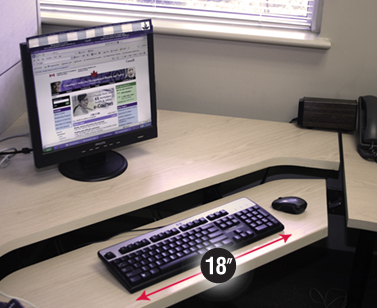
Figure 1
This placement is not the easiest place to reach, however. Having 'extra keys' to the right of the letter and number keys (for example, arrow keys, insert, page down and the number pad) do not allow users to place the mouse more directly in line with their arm and shoulder. Reaching your arm forward or sideways beyond an "easy reach" zone can lead to these discomfort and even injury. Please see the OSH Answers document Computer Mouse: Common Problems from Use for more information.
Where is the right place for a computer mouse?
Back to topThere is no right or wrong place for a mouse. Rather, you must properly assess your work space to make sure you can use the keyboard and mouse without excessive leaning or reaching which may cause discomfort to the body.
Some computer workstations (Figure 2) do not have enough space to properly position a mouse, but a space must be made so that the workstation is safe and comfortable. One way to make this space is by using a mouse platform. Another way to make this space is by using a shorter keyboard (for example, one without a number pad).
How can a mouse platform help computer users?
Back to topWhen there is not enough space on the desk to position a mouse within easy reach, you can use a mouse platform. A mouse platform covers the numerical pad on the right side of the keyboard - which is rarely used in many office functions - and serves as a place for the mouse to sit. (Figure 2). The mouse is then closer to the person using it. As well, because the mouse is on a platform, you avoid the tendency to wiggle it further and further away, which would make you reach even further and increase muscle strain.
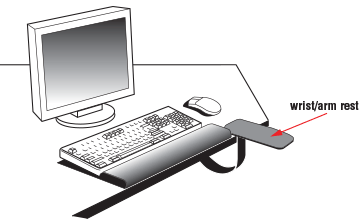
Figure 2
However, the height of the mouse platform puts your hand in a slightly unnatural position. To make using it more comfortable, you can use a forearm support. (Figure 3).
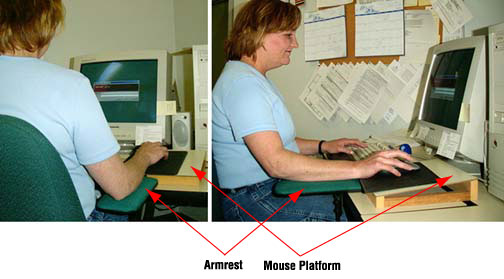
Figure 3
Advantages of a mouse platform:
- Reduces sideways and forward reaching.
- Reduces the overall area in which you use the mouse.
Disadvantages of a mouse platform:
- The platform raises the mouse a little above the keyboard. Using a slightly higher arm support with the platform can position your hand more naturally.
How can a shorter keyboard help computer users?
Back to top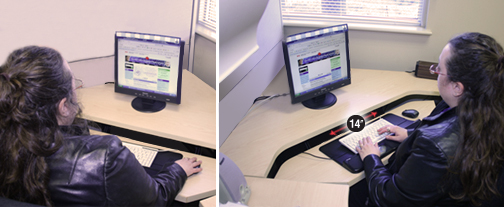
Figure 4
Computer keyboards come in many sizes. By using a shorter (35.6 cm or 14" long) keyboard instead of a regular (45.7 cm or 18" long) one, you will have an extra 10.2 cm or 4 inches of space beside the keyboard where the mouse can be placed (Figure 4).
Advantages of a shorter keyboard:
- The extra 10.2 cm (4 inches) gained by using a shorter keyboard will reduce reaching or leaning.
- Fewer sideways movements mean you will be more comfortable and less likely to get injured.
Disadvantages of a shorter keyboard:
- A shorter keyboard means you have to get used to a slightly different key arrangement. However, most people don't mind this adjustment as long as using the mouse becomes more comfortable.
Note: Whatever shape, size, or application of mouse you use, a battery-powered cordless mouse is highly recommended. It eliminates one of the most common problems with using a mouse: the cord getting stuck or being in the way.
- Fact sheet last revised: 2017-06-01