
Office Ergonomics - Computer Mouse - Selection and Use
On this page
How do I select the right mouse?
Back to topThere are many different designs of computer mice available. It is recommended that employees try different models and see which suits their needs. Some general tips include:
- A battery-powered cordless mouse is highly recommended, because it eliminates a tripping hazard (from the cord), and increases the options for placement of the mouse.
- Shape and size:
- Choose a mouse that fits your hand - that is, it is the right shape and size to support the natural curve of your hand.
- Choose a mouse that maintains a neutral positioning of the hand and wrist.
- A larger mouse that still fits in the palm of your hand helps you use your larger arm muscles rather than the smaller wrist muscles, which tire easily and are more likely to experience Workplace Musculoskeletal Disorders (WMSDs).
- Buttons:
- Choose a mouse with buttons that respond to a light touch, so that you don't have to press too hard to make it work, but one that isn't so sensitive that you hardly have to press it to activate it.
- Choose a mouse with buttons that neither cramps the fingers nor spreads them out too far apart.
- Choose a mouse with a "drag lock" or "click lock" function.
What are the different options for the computer mouse?
Back to topThere isn't a "one size fits all" mouse - there are many different shapes and types of mice that computer operators can use. It's important to try them out and find one that keeps your wrist neutral, feels comfortable in your hand and is the correct size. Some of the popular choices include:
Traditional
- Typically 'tear drop' shaped and symmetrical on each side.
- Comes in various sizes.

Figure 1
Trackballs
- Uses a ball to move the cursor.
- Allows the arm and hand to be held in one place.
- Useful in workstations with limited space as the mouse does not need to move (you move the trackball only).
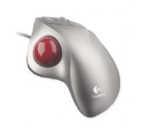
Figure 2
Central pointing devices
- Allows both hands to be kept in a neutral position in front of the body.
- Fewer movements between switching from typing and mousing.
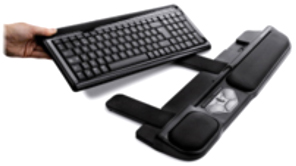
Figure 3
Joystick
- Keeps the hand and wrist in a neutral position.
- Moves the whole arm when mousing.
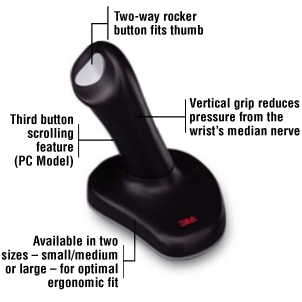
Figure 4
Column/Vertical
- Keeps the hand and wrist in a neutral 'hand-shake' position.
- Moves the whole arm instead of just the wrist when mousing.
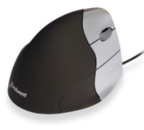
Figure 5
How can I reduce the chance of getting sore, tired, or injured while using the computer mouse?
Back to topA well-designed workstation with a properly selected computer mouse helps prevent discomfort and injury. The following suggestions can help prevent or reduce these injuries.
- Don't squeeze the mouse. Hold it loosely in your hand with a relaxed grip.
- Keep your wrist straight. Your forearm, wrist, and fingers should all be in a straight line (Figure 6). Move the mouse from the elbow joint, rather than just moving your wrist.
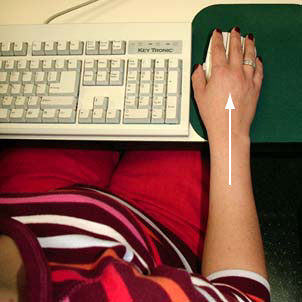
Figure 6
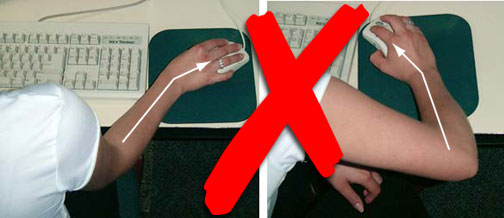
Figure 7
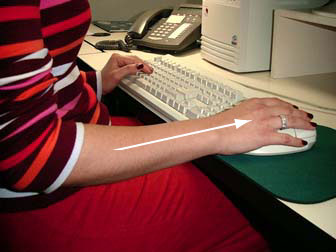
Figure 8
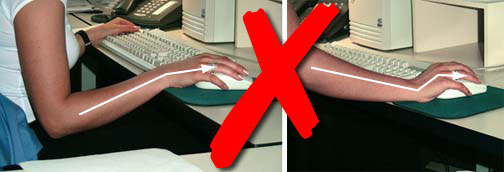
Figure 9
- Protect your wrist. Research on wrist rests is inconclusive. Using a wrist rest incorrectly can put more pressure on the carpal tunnel in your wrist, and restrict the flow of blood to and from the hand, which can lead to the development of Carpal Tunnel Syndrome (CTS).
- Keep the mouse clean. If the mouse becomes jumpy or less sensitive, the problem may be a build-up of dust on the rollers or the laser sensor.
- Alternate the hand using the mouse, if possible.
- Use the shortcut and function keys on the keyboard instead of the mouse whenever possible.
- Fact sheet confirmed current: 2017-06-01
- Fact sheet last revised: 2011-04-01